About SkyStatus - Built by Remco de Graaf
25+ years building digital platforms at scale. Flying Blue Ultimate, member since 2005.

Who I am
I've spent 25+ years in Dutch digital media, building products that scale. In 2004, I founded Zoom.nl, which grew into the Netherlands' largest photography community with 120,000 users. I also built two e-learning platforms: Zoom Academy (80,000 paying students) and Tech Academy (40,000 paying students).
I launched ID.nl, Reshift Digital's most successful website launch. Since September 2026 I am Managing Director and co-owner of Reshift Digital, running the company with Kevin van Oosteren. My remit is innovation, AI, content and community. From 2015 to 2026 I was Director of Content there, leading the Photography, Tech, Games, and Publishing divisions.
Before Reshift, I was Managing Director at Focus (2010-2014) and Editor-in-Chief at IDG Netherlands (1999-2010). That's three decades of turning ideas into digital products people actually use. The same data-driven approach to platform building is behind SkyStatus.
Why I built SkyStatus
For years, I tracked my Flying Blue progress in spreadsheets. XP earned per flight. Miles from credit cards. Rollover calculations. Cost-per-mile analysis. It worked, but it was tedious, and I knew I wasn't the only one doing this.
The official Flying Blue app shows your current balance, but it doesn't answer the questions I actually cared about:
- How many XP do I need, and when does my qualification year end?
- What's my cost-per-mile across all earning sources?
- If I do a mileage run to Barcelona, will I make Gold before February?
- How much of my XP will roll over if I don't requalify?
SkyStatus answers all of these. I built the tool I always wanted, and now it's available for everyone who's serious about optimizing their Flying Blue journey.
Flying Blue experience
I've been a Flying Blue member since 2005, the year the program launched from the merger of KLM's Flying Dutchman and Air France's Frequence Plus. Over two decades, I've held every status level from Silver to Platinum as travel patterns shifted between business trips and family holidays. On 2 August 2026 I reached Ultimate, the program's highest tier, which requires 900 UXP earned on flights marketed by Air France or KLM (an AF or KL flight number) on top of Platinum qualification.
That journey is not a weakness. It means I understand the program from every angle: the first-timer figuring out how XP works, the Silver member wondering if Gold is worth it, the Platinum holder optimizing rollover, and the Ultimate member tracking UXP. I have completed at least 15 mileage runs. My travels have taken me to at least 60 countries.
SkyStatus is built on that hands-on experience combined with a complete analytical model of the Flying Blue program, reconstructed from official rules and real-world data.
Ultimate, verified
Ultimate is an exceptional claim, so it deserves proof rather than words. Below are my Flying Blue membership card and my Flying Blue dashboard, captured on 3 August 2026, the day after the status was awarded.

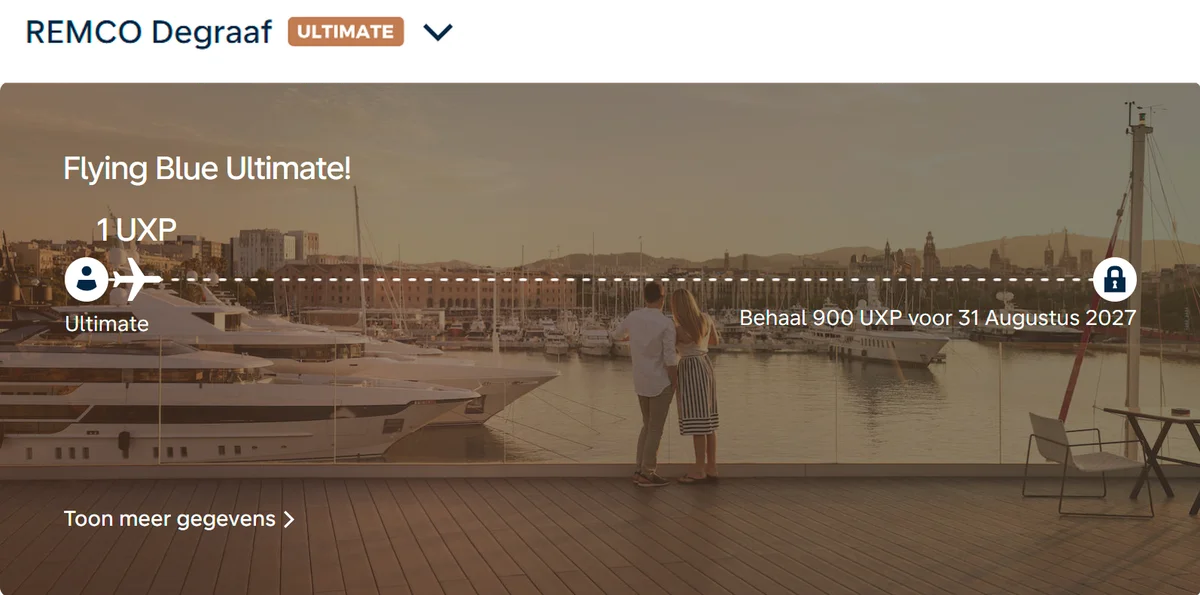
For safety, the Flying Blue membership number and the QR code have been removed from these images. Everything else is unedited.
Why you can trust SkyStatus
Built by a member
Created by a Flying Blue Ultimate member, in the program since 2005, who uses it for his own status tracking.
Based on official rules
Calculations follow Flying Blue's published earning and qualification rules.
Clear limitations
I tell you when calculations are estimates and always recommend verification.
Independent of Air France-KLM
Independent tool. No commercial relationship with Air France-KLM or Flying Blue.
Independently verified
Scam Detector’s automated website reputation score for skystatus.pro was 100/100 when checked on 13 September 2026. Read the full report.
Privacy & data
- PDF text extraction: Your Flying Blue PDF is sent to Microsoft Azure Document Intelligence (EU region) to extract the text. Azure processes it under a GDPR agreement and does not keep it afterward.
- Stored for review: To verify and fix an import, SkyStatus stores the original PDF and the extracted data in private, access-controlled storage that only you and the operator can reach. You can remove stored import files under Settings, Privacy, and request deletion of your import data at any time.
- Your data belongs to you: Export or delete your account data anytime from Settings, Account & data. Your name and Flying Blue number stay in your private import data, never in your public profile.
- Privacy-first analytics: SkyStatus uses lightweight, first-party analytics to improve the product. Manage analytics and other cookies from the Cookie Settings link in the footer.
- Open about limitations: I tell you when calculations are estimates and recommend verification with Flying Blue.
How this content is made
- Editorial direction and final responsibility are mine. Flying Blue member since 2005, Ultimate today, at least 15 mileage runs completed and at least 60 countries visited. Which questions matter, which official answer is wrong and what a line on a statement actually means is my judgment, and I am responsible for everything published here.
- AI is used to produce it. It helps with research, drafts and translations into four languages. Sources and programme rules are reviewed as part of content updates. It is not a byline and it is not a source.
- Automated checks support the editorial process. Program values resolve from one authoritative source. Member-data statistics are recalculated every week from members' own Flying Blue history, and are only published as a number once at least 30 members are in the sample. A statistic that stops holding is deactivated, which fails the next build of every page carrying it until the wording is corrected.
- Corrections. Found something wrong? Use the contact form. Factual errors are corrected in every language the claim appears in.
Top guides
What is Flying Blue XP?
How XP works, how it's earned, and why it matters for your status.
Flying Blue status levels
Silver, Gold, Platinum, Ultimate: what each level unlocks.
Earn XP fast
Strategies to reach your next status level faster.
Flying Blue sweet spots
The best-value award tickets you can book with miles.
Mileage run calculator
Calculate whether a mileage run makes financial sense.
Ready to track your status?
Start free, set a goal, and let the Status Coach show your cheapest next step. Import your Flying Blue PDF to see your real XP, miles and value.
Start tracking freeContact
Questions, feedback, or bug reports? I read everything. Use the bug report button in the app to report issues.
Press or media? See the press page for expert commentary on Flying Blue and loyalty programs.